
Threat Model: SIM Swapping And How To Protect Yourself
Threat Model Series

Since there were some recent arrests made on threat actors who employ some of these tactics (more on this below), I thought I’d re-visit the threat model of SIM Swapping.
We’ll walk through some scenarios, and counter-measures to combat against this threat.
To set the stage, let’s say the threat you’re trying to protect against is unauthorized access to your data. The vulnerability here is a misconfiguration in the system, for example no second factor or MFA enforced. The risk is the impact of your data being accessed and the likelihood of this scenario being carried out.
You can make the argument that not all risk for this threat is created equally.
Think journalists, high net worth individuals, or someone who is worth a lot in Cryptocurrency. Their threat model is different from most when it comes to this threat.
In this case, the risk is applied differently. The impact of a successful SIM Swap is great in either case, however the likelihood is not the same.
Another way of saying this would be, the threat model for a journalist is different from that of say a teacher at a University.
The short version here is that a strong form of MFA will be your best bet here.
Let’s dive into the details.
We can think of SIM Swapping as having two main forms.
Getting your phone number ported to another (attacker owned) phone
The physical threat
Now, let’s go over each of these scenarios.
SIM Swaps
SIM Swap attacks of this kind can be carried out with recon and social engineering. It could look like this.
An attacker does recon and enumerates their target to build a profile, (think enough to answer security questions), contacts the mobile carrier, answers the security questions, and convinces them to port the target’s phone number over to their SIM card to a phone they control.
If this fails, the attacker can also bribe them, as this has worked before.
In the end, they have your SIM ported over to a phone in their possession. Chaos then ensues.
They now have access to your SMS texts, email, and account flows. This means, they can start to reset everything, kicking off the password reset flows, effectively locking you out of your accounts.
In a nutshell, it could look like this
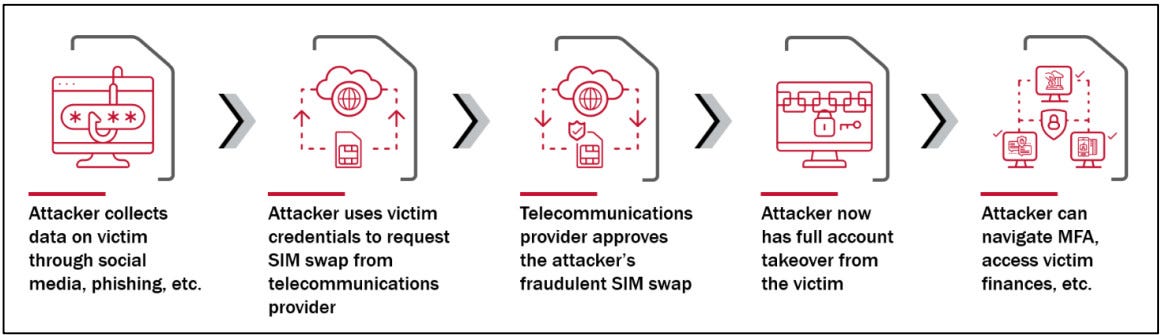
We should not underestimate the scale of the effects of SIM Swaps, as groups like Lapsus$ have shown us in recent years.
OTP and SMS are vulnerable in this case, given that one-time codes will go to the phone number that is now ported to the attackers phone; and SMS is being sent to the attackers phone.
Another way attackers can accomplish this is by stealing credentials. They can do so via initial access brokers (IABs) where they purchase credentials and then take the steps outlined above.
This shortens the recon time and gets them right to execution of the attack.
How to Protect Yourself
So what can you do?
Here are some steps to take to protect yourself
Setup a PIN on your carrier account
Setup a PIN on your SIM
Use answers only you would know (or wrong answers) for your security questions
Use security keys or passkeys as your 2nd factor
Now let’s go over these in a bit more detail.
Set a PIN on your mobile account. You do this with your carrier. This way, if someone tries calling to port your phone number to another SIM, they will need to know this PIN to move further.
Set a PIN on your SIM. You do this locally on your phone. This process will vary if you’re on iOS or Android. This means upon any restart or removal of the SIM, the PIN is needed for any actual service of the phone.
You can do this for a SIM card or eSIM.
Enabling a SIM Lock on your phone. Sometimes known as a port-out lock, this will prevent unauthorized account changes, and can be your single biggest security measure against SIM Swapping.
Use security question answers only you would know. The more obscure the better. Some security professionals opt for fake answers here. (Just make sure you remember them)
On a related note, consider the amount of personal information you share online. In today’s world, this might be difficult for many people. Think before you share on social media and other sites, and if it’s worth it from a risk perspective.
Use FIDO2 security keys or passkeys. Doing this will ensure you are using the strongest form of two-factor authentication.
Opt out of SMS as your second factor whenever possible. There’s just too much downside potential when using SMS-based MFA. As a last measure, check your account settings if your phone number can be used for recovery purposes.
If you’re using hardware security keys you are using phish-proof measures to protect your account, just ask Google employees.
This also ensures that a physical attack is the only threat that is able for a successful SIM Swap.
The Physical Threat
This is one of the most insidious threats out there albeit not as common, however has definitely been documented. In this threat model, the impact of this risk is great as the victim’s life is in danger, but the likelihood for most people would be lower.
However certain threat actors have opted for this kind of physical attack as part of their arsenal, these black bag operations where a target is pursued for their assets which are tied to their phone.
In this scenario, this would be someone locking in as you as the target, physically threatening you for your credentials, and having you authenticate with your security key.
Obviously, this won’t apply to everyone but you can assess what is the risk here in your day to day life.
That being said, hardware security keys are still the strongest form of MFA and should still be the route you choose.
Consider the counter argument here. Being against hardware keys due to the risk of someone being in proximity of your laptop (think an open office), using the plugged in key to your laptop to auth, and log in as you.
There are greater risks out there for most people ¯\_(ツ)_/¯
If you take nothing else from this post, adding security keys as your second factor and adding a SIM lock are probably the biggest ROI actions the average internet user can take to protect themselves.
What I Read This Week
Chinese Network Selling Thousands of Fake US and Canadian IDs
Example use cases for those buying the IDs are counterfeit commercial driver’s licenses linked to two trucking companies, and SIM Swaps, crazy stuff
This reminds me of the DPRK worker impersonation campaign, many utilizing fake or stolen IDs
EDR-Freeze: A Tool That Puts EDRs And Antivirus Into A Coma State
This tool allows you to disable EDR tools all via user-mode by leveraging a vulnerability in the WerFaultSecure program, and a race condition
This is currently specific to Windows
Malware Quickbytes: Python Stealer
Some TTPs of this malware include: Anti-VM checks, stealing browser saved login data, and exfils it to a C2
Interesting tidbit, it had module imports in the middle of the script, which is unusual
You can see this in the flesh here
Alleged Scattered Spider member turns self in to Las Vegas police
The unnamed youngster turned himself in to Clark County Juvenile Detention Center
This is for the crimes related to the cyberattacks affecting many casino resorts on the strip
This leads us to the next related story
U.K. Arrests Two Teen Scattered Spider Hackers Linked to August 2024 TfL Cyber Attack
A callback to a story from last week, 2 individuals tied to Scattered Spider arrested. Looks like they knew what was coming
Their operations resulted in approximately 120 breaches
This arrest was for their role in the August 2024 attack on Transport for London (TfL)
An older report (Q1 2025), but it aligns with the recent massive spikes in open source malicious packages
This is what we have seen recently, developer credentials are the targets now
Wrapping Up
In this post, we went over the threat model of SIM Swapping. The different ways this can look, and how to protect yourself.
In the end, where you choose to focus your security efforts to protect yourself depends on your threat model.
See you in the next one.